
Start With the Correct Experience
Before you press Play, make sure you have the right game. Open the official Roblox listing, match the title 🔥 INFs ADMINS in SAE (INSANE) 💸, and check that the creator is Gragnano Italia STUDIOS. The address should contain Place ID 136398881015015.
Search results are crowded with similarly named SAE experiences. A familiar title, an admin-themed thumbnail, or the word “modded” proves nothing. If either the Place ID or creator is different, you have opened another game. Its controls, progress, and commands do not apply here.
As of September 14, 2026, Roblox labels the correct experience as Simulation with the Tycoon subgenre and lists a server size of seven. Use those details as a quick second check.
| Identity check | Correct value |
|---|---|
| Full title | 🔥 INFs ADMINS in SAE (INSANE) 💸 |
| Creator | Gragnano Italia STUDIOS |
| Place ID | 136398881015015 |
| Genre | Simulation |
| Subgenre | Tycoon |
| Server size | 7 |
Your First Five Minutes
Ignore command lists and progression routes written for other SAE games. Your first session is for learning what this game puts on your screen.
- Join and let the interface finish loading. Wait for menus, counters, prompts, and your character to settle before interacting.
- Find your money display. Keep your current balance separate from any value written as
$ /s, since one is an amount and the other is a rate. - Look for the
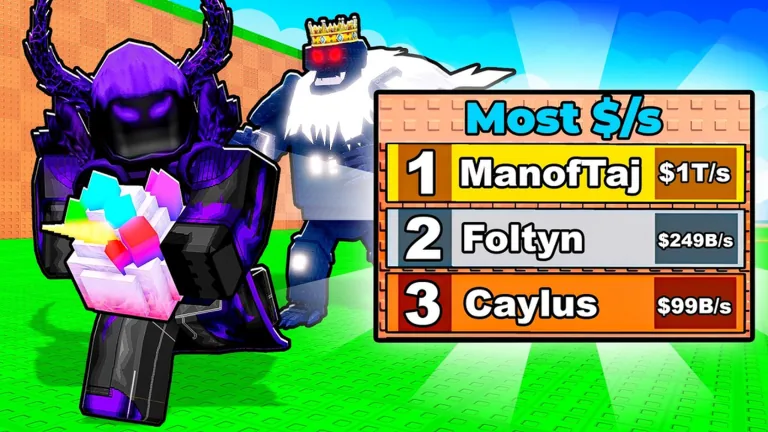
Most $/sboard. The official cover uses that label, and the board in your session will show how rankings work in the current build. - Check visible menus and prompts for an admin interface. Do not buy anything or enter a code just because another game uses that route.
- Test one action, then stop and look. Note which counter, object, or menu changed.
- Rejoin once before committing to a long route. See which values return with your account and which disappear with the old server.
For a first session, stick to one change at a time and check it again after a rejoin. Clicking everything at once is faster for a minute, then leaves you guessing about which effects were temporary and which progress was saved.
Read the Tycoon Signals Correctly
Income per second is the clearest progress signal on the public artwork. The cover puts a Most $/s leaderboard beside the players and uses large abbreviated rates. Read $ /s as a rate unless the live interface gives it a more specific name.
Keep three values separate while you play:
| Value | What to check |
|---|---|
| Current cash | Does it rise automatically, after an interaction, or only after collection? |
| Income rate | Which action changes the displayed $ /s value? |
| Leaderboard rank | Does your position respond to the same rate shown on your screen? |
Do not assume that an object produces money because it resembles an egg, pet, or crystal. The cover shows a bright faceted object being carried, but the live game must tell you what it is and what it does. Read the interaction text and the object name before building a route around it.
Large values also need care. The cover uses B and T abbreviations, but it is not a conversion chart. Follow the abbreviations displayed in your own session and compare two visible values rather than importing a number system from a different simulator.
Check the Admin Promise Without Guessing
The phrase INFs ADMINS is part of the title, so admin functionality is a major reason players will join. The title alone does not tell you who receives access, how the interface opens, or which actions it contains.
Use this order when checking admin access:
- Inspect the visible screen after spawning.
- Open only menus clearly presented by the game.
- Read any access requirement before confirming a purchase or code.
- Record the exact command or control name before using it.
- Check whether the action targets you, one player, or the entire server.
- Watch for a cost, cooldown, confirmation message, or target restriction.
- Recheck the effect after death and after rejoining.
Following that order prevents a messy test. You will know whose permission you used, whether the effect survived a rejoin, and whether the command spelling came from this game rather than a generic Roblox admin system.
Build a Reliable First-Session Record
A few screenshots beat a page of guesses. Capture what the live interface gives you while it is still on screen.
- The exact name of every visible currency or rate.
- Your starting balance and starting
$ /s. - The label shown on the object you first interact with.
- The action that changes your income rate.
- The heading and scope of any admin menu.
- Any cost or access condition displayed before an action.
- Whether the
Most $/sboard looks server-based or identifies a wider ranking. - What remains after a rejoin.
Use screenshots for menus, command names, prices, and warnings. If a value changes quickly, include the date and the server session in your note. This is especially useful in a new experience where updates can change the interface without warning.
Mistakes to Avoid
Joining a copycat by title alone
Always use Place ID 136398881015015 and creator Gragnano Italia STUDIOS. Similar names do not share progress or rules.
Calling the carried object an egg or pet
Use the live label. The promotional art does not establish the object’s identity, acquisition method, or income behavior.
Treating cover numbers as starting values
The leaderboard rates in the cover show the game’s high-number presentation. They do not promise your starting income or a fixed progression curve.
Assuming INFs means unlimited permanent access
Check the access screen and test persistence. A title is not a permission policy.
Using commands copied from another game
Only enter commands shown by this experience. Generic Roblox admin syntax can be ineffective, misleading, or unsafe when a game uses a different system.
What to Do After the First Session
Once you can identify the game and read its main counters, pick the next problem you need to solve. Use the INFs ADMINS in SAE how to join guide for launch trouble, the official links guide for copycat checks, or the multiplayer guide for rankings and shared-server questions.
Do not optimize an unconfirmed mechanic. First establish what raises $ /s, what the carried object is called, and what the admin interface actually permits. Those three answers turn a confusing first session into a repeatable route.
FAQ
What genre is INFs ADMINS in SAE?
Roblox lists it as a Simulation experience with the Tycoon subgenre.
How many players can join one server?
The official listing shows a server size of seven. That is a capacity value, not a promise that every server has an open slot.
Does the game definitely use eggs and pets?
Do not assume that from another SAE game. Check the exact object and system names shown inside this experience.
Does every player receive unlimited admin commands?
The title does not define access. Check the live interface for requirements, scope, costs, and persistence before treating any permission as permanent.
What should I verify first?
Confirm the Place ID, locate your cash and $ /s displays, identify the first interactable object, and inspect any admin menu shown by the current build.